You can’t imagine CS2 without a tactical component. In today’s Counter Strike 2 Best Smokes guide we will lay out where, when and what grenades should be thrown to make winning the round much easier.
- Counter Strike 2 Best Smokes Key Takeaways
CS2 smokes can decide rounds before the first duel starts. A good smoke blocks vision, slows rotations, and gives your team safer space to take a site. - Smoke grenades work best when you know the throw type. In Counter Strike 2, players use left-click throws, right-click throws, jump-throws, walk-throws, and mixed lineups.
- The fastest way to practice smokes in CS2 is through the Practice menu. Pick a map, turn on Grenade Camera, Infinite Ammo, and Infinite Warmup, then repeat each lineup until it feels stable.
- The console method gives more control over your CS2 training map. Use map de_mirage, sv_cheats 1, noclip, and grenade practice commands to build a proper local server.
- Mirage, Inferno, Nuke, Ancient, Anubis, and Overpass all need basic smoke knowledge. Even a few reliable lineups can make Premier and matchmaking rounds much easier.
- CS2 Smoke Practice Console Commands save a lot of time. Infinite ammo, long round timers, grenade trajectory preview, and rethrow binds help you test every smoke from both sides.
- The best way to learn CS2 smokes is repetition, not memorizing ten lineups at once. Pick one map, train two or three key smokes, then add more after they feel natural.
 4.9
4.9Types of Grenades in Counter Strike 2
In Counter Strike 2 you can buy 5 types of grenades, these are:
- Flashbang – That same annoying grenade that constantly makes you stand with a white screen when you play defense;
- Smoke grenade – The hero of our guide and one of the most useful grenades in the entire game;
- High Explosive grenade – A fragmentation grenade to help you finish off an enemy in cover;
- Incendiary grenade – A great grenade to help you zone out the enemy;
- Decoy grenade – Perhaps the most useless grenade, but even it can be useful in rare cases.

How to Throw Smokes in Counter Strike 2
There are several ways to throw grenades (mostly smokes):
- Left-click throw – simply press LMB while not moving;
- Right-click throw – press RMB to throw grenade in front of you;
- Two-button throw – Press the left and right mouse button, then throw the grenade. This way the grenade will not fly as far as a normal throw, but not as little as a LMB throw;
- Jump-throw – Hold LMB, jump and release the button. There is also a bind for this type of throw:
- alias “+boing” “+jump”
- alias “+ding” “-attack; -attack2”
- alias “+dong” “-jump”
- bind X “+boing; +ding; +dong” — instead of “X”, set a bind-friendly button.
- Walk-throw – Hold LMB, then hold shift (or even go without holding shift) and go forward, then release the button.
Sometimes you will combine some ways of throwing smokes. For example, jump-throw while duck-walking (walking forward while ducking). And if you have yet to pass the play matches, but want to go straight to the real battles, use our CS2 Placement Matches Boost.
How to Practice Smokes in CS2
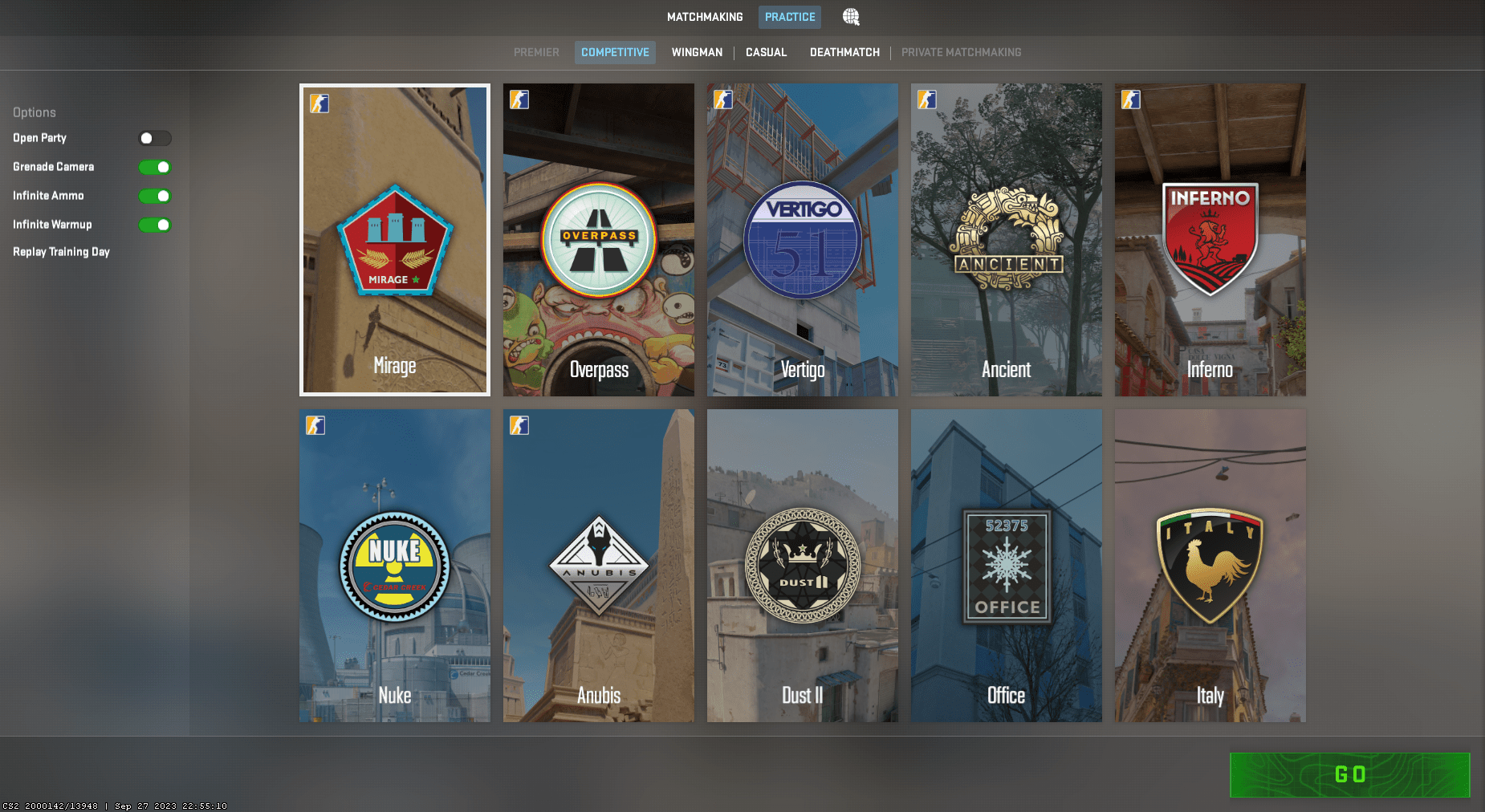
Practicing smokes in CS2 is much easier when you set up a clean local training map. You need an empty server, infinite grenades, grenade camera, and enough round time to repeat each lineup without pressure. There are two simple ways to create this setup: through the Practice menu or through the developer console.
The first method works best if you want the fastest setup. Open CS2, click Play, then choose Practice from the top menu. After that, pick the map where you want to train your smokes. For example, select Mirage if you want to learn Window, Jungle, CT, or Connector smokes. Choose Inferno for Banana and A-site utility, or Nuke if you want to practice outside smokes.
Before starting the match, check the practice options in the top-left corner. Turn on Grenade Camera, Infinite Ammo, and Infinite Warmup. Grenade Camera helps you see where the smoke lands, Infinite Ammo lets you throw without rebuying, and Infinite Warmup removes round pressure. Once everything is ready, start the map and join the side you need for the lineup.
After loading into the map, buy a smoke grenade and move to the lineup spot. Stand on the exact reference point, place your crosshair on the needed pixel, then throw the smoke. After it lands, use the grenade camera or walk to the target area and check the result. If the smoke leaves a gap, adjust your crosshair slightly and repeat the same throw.
The second method is the classic local server setup through the console. First, open Settings, go to Game, find Enable Developer Console, and set it to Yes. You can open the console with the ~ key. If that key does not work, check your keyboard layout or bind the console in the settings.
Now open the console and type the map command. Use map [map name] and replace the map name with the map you need. For example, type map de_mirage to practice Mirage smokes. You can also use map de_inferno, map de_nuke, map de_ancient, map de_anubis, map de_overpass, or map de_dust2.
Once the local map loads, open the console again and enter sv_cheats 1. This command unlocks practice commands on your local server. From there, you can add infinite ammo, longer round time, grenade trajectory tools, and a noclip bind. Noclip is especially useful because you can fly from your throwing spot to the landing area in a few seconds.
A good training routine is simple. Pick one smoke, throw it five to ten times, then check the landing spot from both sides. After that, bind rethrow and test how the smoke looks from an enemy angle. This way you learn not only the lineup, but also why it works during a real CS2 round.
CS2 Smoke Practice Console Command
Console commands make CS2 smoke practice much smoother. They give you infinite grenades, remove round limits, show grenade paths, and let you move around the map faster. Open the CS2 console on your local server, then copy the commands below:
- sv_cheats 1
- bot_kick
- mp_warmup_end
- mp_freezetime 0
- mp_roundtime 60
- mp_roundtime_defuse 60
- mp_buy_anywhere 1
- mp_buytime 9999
- mp_maxmoney 60000
- mp_startmoney 60000
- sv_infinite_ammo 1
- ammo_grenade_limit_total 5
- sv_grenade_trajectory_prac_pipreview 1
- sv_grenade_trajectory_prac_trailtime 8
- sv_showimpacts 1
- sv_showimpacts_time 10
- mp_restartgame 1
Use these extra binds if you want faster smoke practice in CS2:
- bind “X” “noclip”
- bind “K” “sv_rethrow_last_grenade”
Replace X with any free key you like. The noclip bind lets you fly around the CS2 map and quickly check smoke positions. The rethrow bind repeats your last grenade, which helps when you want to test a smoke from the defender’s point of view.
Best smokes for Mirage in CS 2
The most popular map in Premier or matchmaking. Make sure you learn all the grenades in the video so you don’t get in trouble in front of your teammates.
Best smokes for Ancient in Counter Strike 2
It used to have Dust2 in its place, but is now out of Premier mode. However, the map is very good, and knowing smokes will make your life a lot easier.
Best smokes for Overpass in Counter Strike 2
Incredibly important grenades will break the main chip of the map – the quick rotation of defenses from one point to another.
Best smokes for Vertigo in Counter Strike 2
It’s impossible to play without knowing grenades. Be sure to check out the video, otherwise you risk losing before you even start playing the second half of the rounds.
Not playable now.
Best smokes for Inferno in Counter Strike 2
The second most popular map. Highly recommended to check the video.
Best smokes for Nuke in Counter Strike 2
One of the best maps where smokes are an indicator of a successful take on the round. Don’t even try to play without basic knowledge, but rather watch the video and hone your new skills.
Best smokes for Anubis in Counter Strike 2
Fair or not, this map is the most unpopular of all the others. However, it’s still worth knowing Smokey if you want to play at the highest level! In this video we’ll go over all the grenades you need to win the game.
4.9We hope the information was useful to you, as for our team it has saved rounds and even whole matches more than once. And now with our help you will be able to throw smokes like a pro. We would be grateful if you share these guide with tips and tricks or videos with your friends!
