In this Where Winds Meet multiplayer guide, we will take a look at how to join and participate in different online activities in the game. Multiplayer functionality in this game gives you several ways to play with other people. You can explore the world alongside other players, or play in Co-op with your private group for questing. If you want to discover more info about builds before learning how to play Where Winds Meet with friends, check out our guide for Where Winds Meet Builds.
Where Winds Meet Multiplayer Key Takeaways:
- There are three main modes in Where Winds Meet: Solo and two multiplayer modes — Online and Co-op.
- Online Mode unlocks at level 10 and places you in a shared world with all active online players.
- To unlock the Online Mode players need to finish the tutorial and interact with a shrine.
- Where Winds Meet supports full cross-play before all devices the game is on.
- Online Mode does not allow main story progress, but supports dungeons, bosses, PvP, and other multiplayer activities.
- Co-op Mode is private and allows up to five players to join the host’s world and share quest progress.
- Co-op Mode contributes to your solo level, unlike Online Mode.
Where Winds Meet Online and Co-op Mode Differences

- Online Mode: Shared world, no main story progress, MMO-like experience
- Co-op Mode: Private group, shares host’s quest progress, counts toward Solo level
Where Winds Meet Online Mode puts you into the same world as other active players upon reaching level 10. It makes the world feel busier and gives you quick access to dungeons, bosses, and PvP. However, you can turn it off if you would like to play solo or progress the story.
Where Winds Meet Co-op mode is a smaller, private version of multiplayer where up to five players join the host’s world. Progress on the host’s quests counts for everyone nearby. Co-op Mode uses your Solo Mode Level, which affects your character growth and main progression. Each mode tracks different progress, so you can use both depending on what you want to do.
📌 You can move back to Solo Mode whenever you want to continue your personal quests.
Where Winds Meet How to Co-op
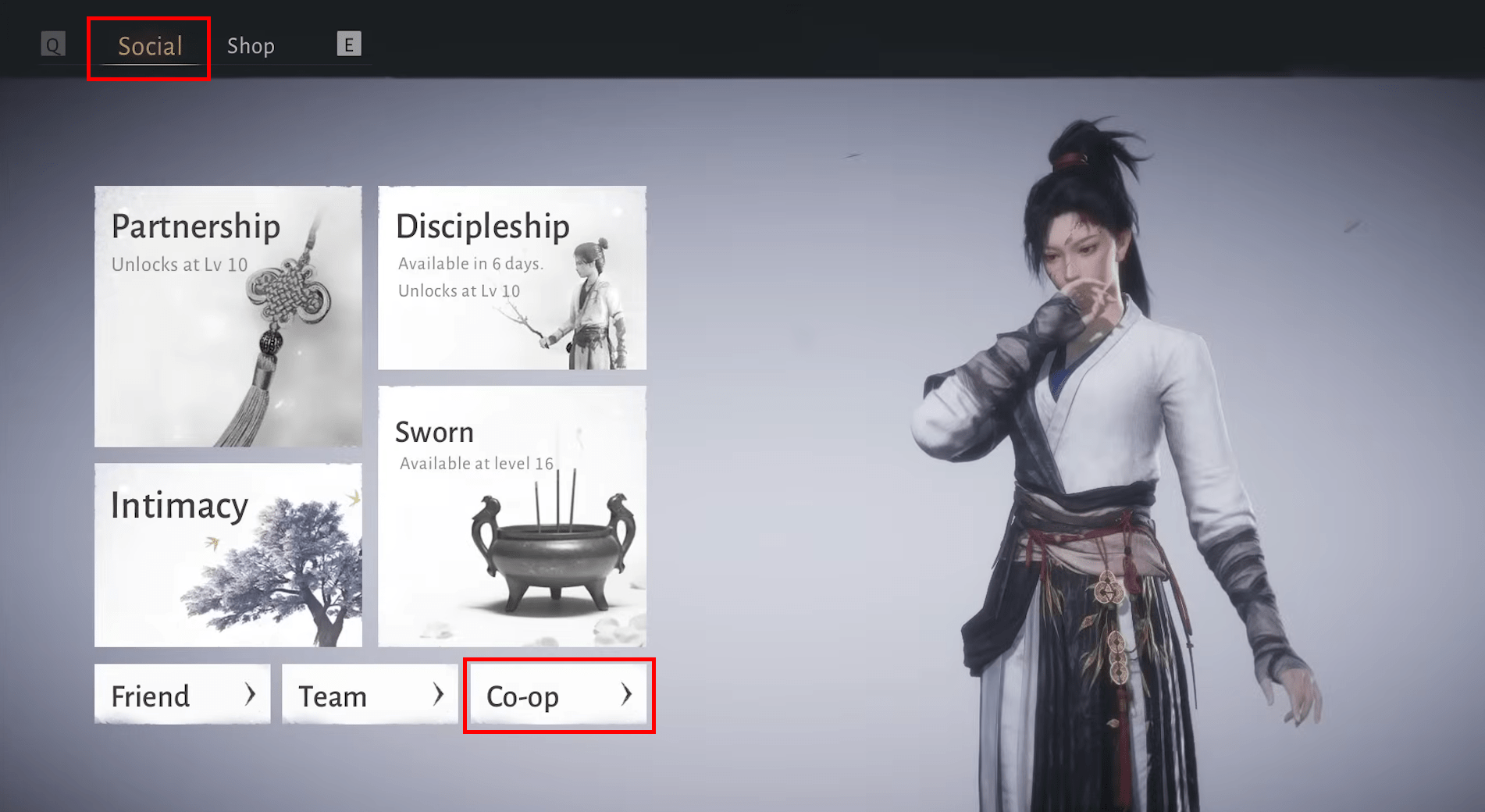
To play Co-op Mode in Where Winds Meet:
- Open the Social tab
- Select “Co-op” on the bottom right
- Send or accept invitations to play
If you want to learn how to play Where Winds Meet with friends, the answer is simple. You can accept a Co-op invitation from your chat window or open the Social menu and select the Co-op tab. From there, you can enter a Co-op code to join friends on other platforms or browse open lobbies if you want to join a random group. This makes it easy to drop into a session without much setup.
To host Where Winds Meet Co-op, open the Social menu, go to the Team section, and choose Create Team. You can send invites through Steam, PSN, or generate a cross-platform code. There’s also a Quick Team option that matches you with other groups that need players. Co-op supports up to five players and works for almost every activity except story missions.
Where Winds Meet How to Play Online
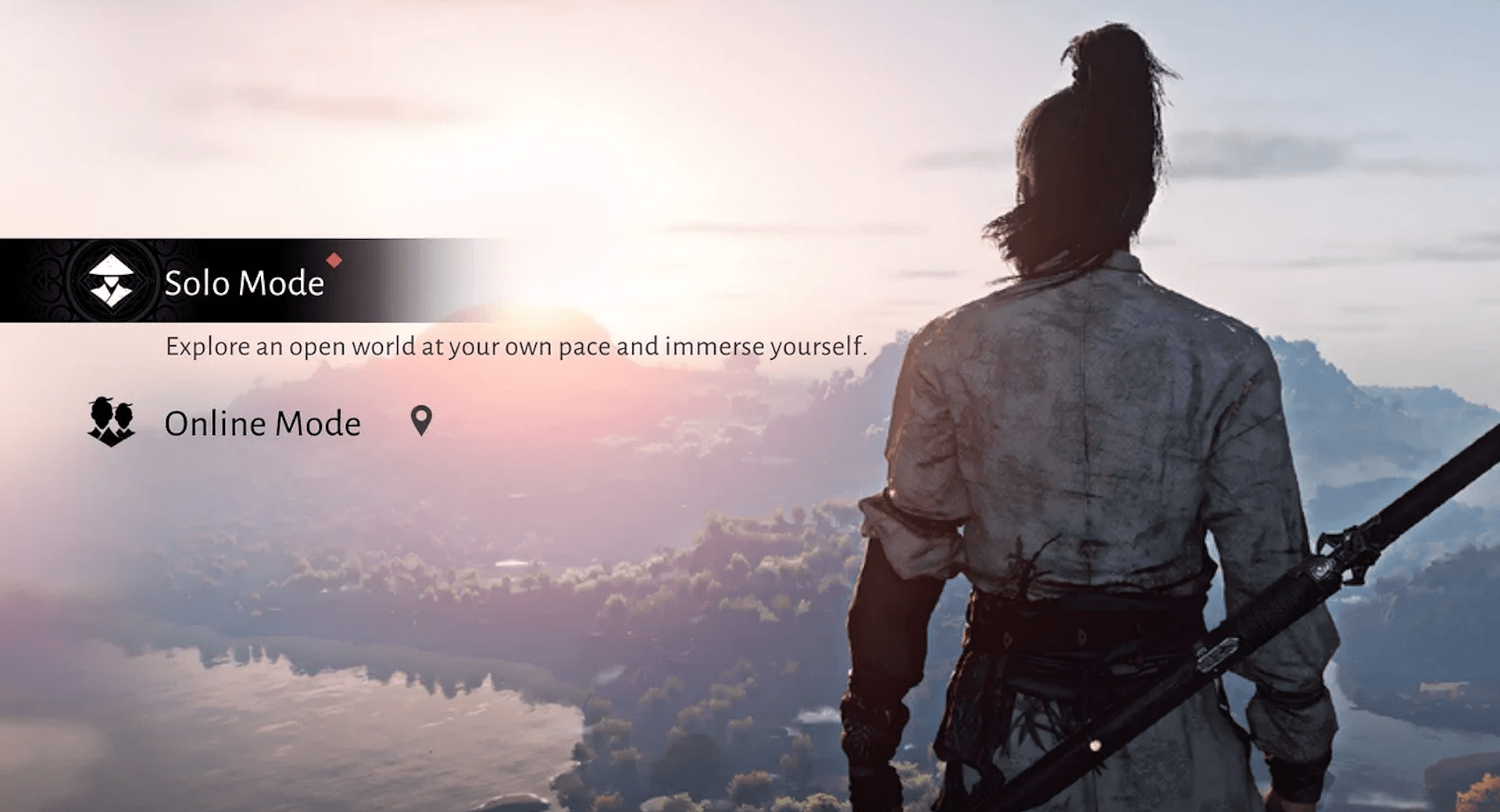
To play Online Mode in Where Winds Meet:
- Open the menu
- Select “Mode Switch” at the top of the screen
- Select Online Mode
To play Where Winds Meet online, you’ll first need to reach level 10. Once you hit that point, you can switch between Solo and Online modes at any time using the Mode Switch button at the top of the screen.
Online Mode places you in a shared world with other players. You won’t be able to progress the main story here, but you can join world events, fight bosses, enter dungeons, help others through the Assist system, and take part in Open World PvP. It’s the closest thing the game has to a traditional MMO experience.
Where Winds Meet Online Assists
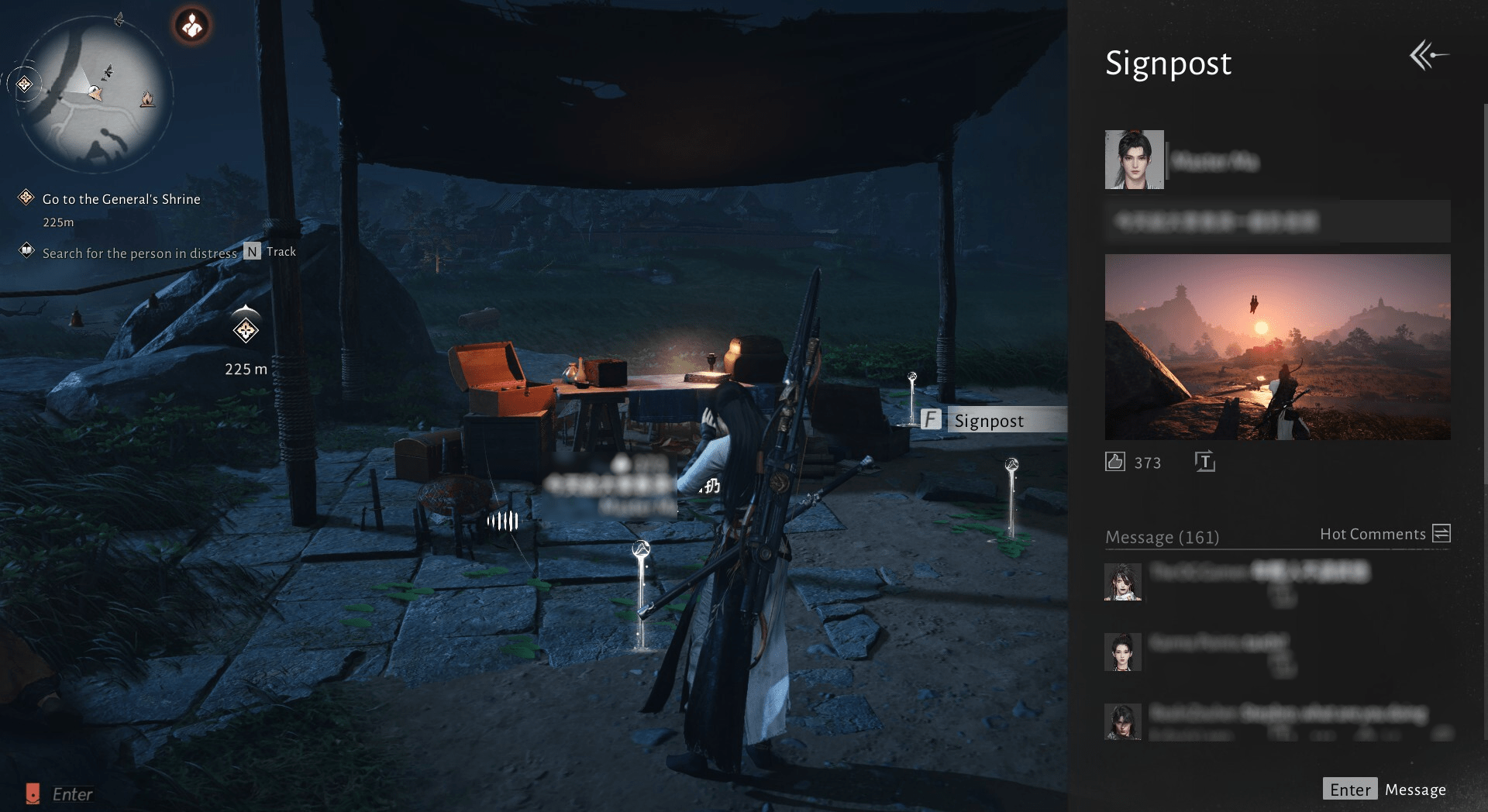
Where Winds Meet Assist system lets players help each other out during regular exploration. Sometimes, you will be able to see small yellow signposts marked “Assist.” These belong to other players who need help with a challenge or an enemy. Interacting with signposts lets you join their fight and quickly help them.
If you need help yourself, you will need a Signpost item. You can buy or craft these, then use them from your inventory. When you use it, you can write a short message and turn on Assist Invitation so others can see it. You can also add an image or emote, which makes the request easier to spot. It’s a simple way to get assistance when something hits harder than expected.
Where Winds Meet How to Access PvP
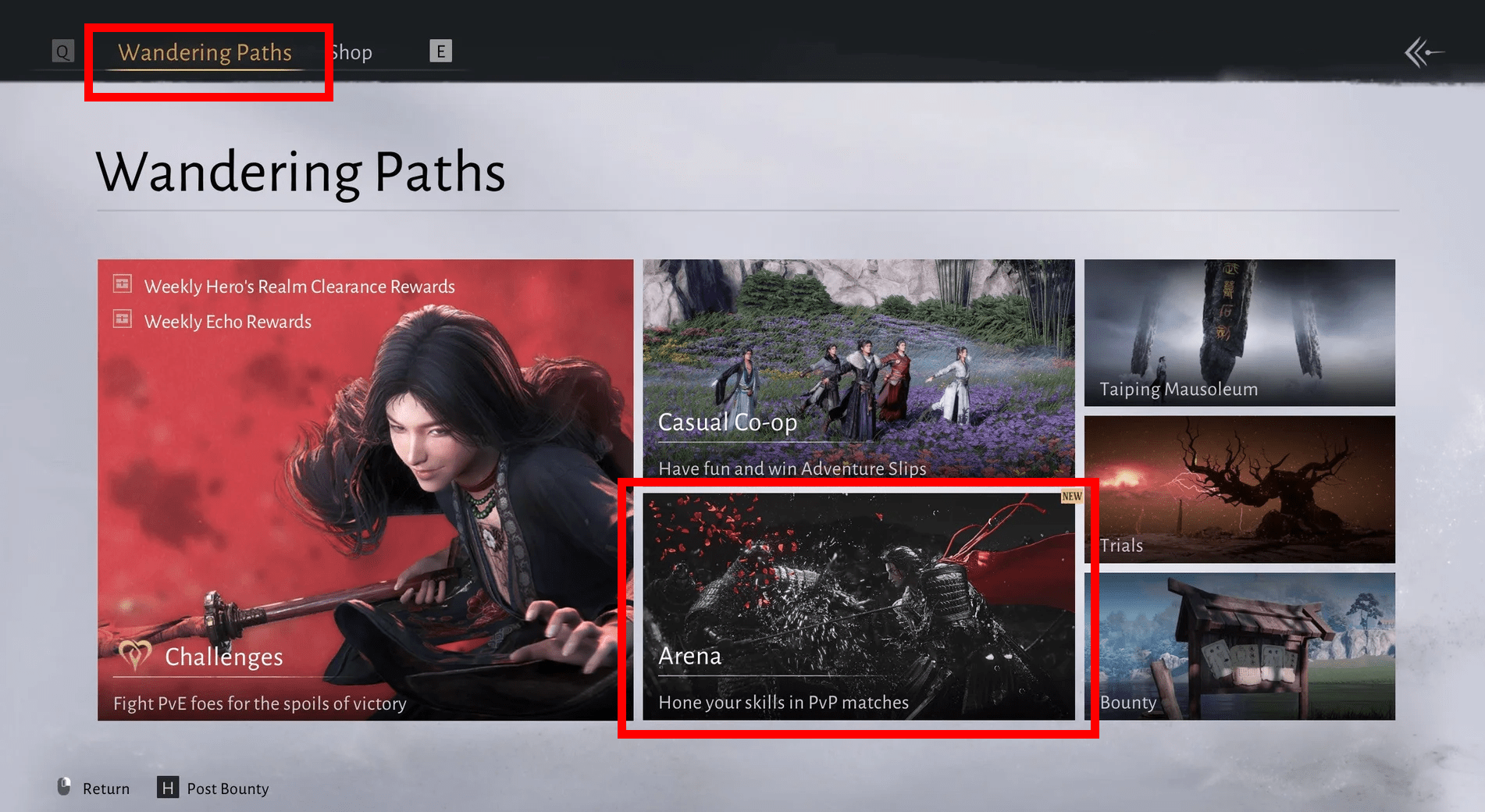
If you are wondering how to play PvP in Where Winds Meet, then first you will need to reach level 10 for Open World PvP and level 22 for Arenas. Arenas are organized matches that let you test your build in a controlled setting.
Open World PvP is more casual and lets you challenge players you meet while exploring. Both systems work independently, so you can focus on whichever style you prefer or switch between them during your play session.
How to Play Arena in Where Winds Meet
Where Winds Meet Arena PvP is the main way to play against other people. To play Arena, simply reach level 22, open the Wandering Paths menu, and select Arena. Here you will find several PvP game types, each with its own rules and matchmaking. After choosing a mode, you will queue up and get matched with other players who are also looking for a fight.
How to access Arena PvP in Where Winds Meet:
- Reach Level 22
- Open Wandering Paths
- Select Arena
- Choose a game mode and enter the queue
How to Play Open World PvP in Where Winds Meet
To join Where Winds Meet Open World PvP, simply switch to Online mode and find a player to fight. If you come across another player you want to challenge, you can target them, inspect their character, and press the Spar button to send a duel request. If they accept, the two of you will enter a direct fight on the spot. This is a low-pressure way to practice PvP. It often leads to quick, friendly duels while traveling between activities.
How to start Open World PvP in Where Winds Meet:
- Switch to Online Mode
- Find another player in the world
- Inspect them and select Spar to send a challenge
Where Winds Meet Cross-play and Cross-progression
Cross-play is available by default in Where Winds Meet. PC and PS5 players share the same world, matchmaking queues, and Co-op lobbies. There’s no toggle to turn this off, so you’ll always play with the full player base.
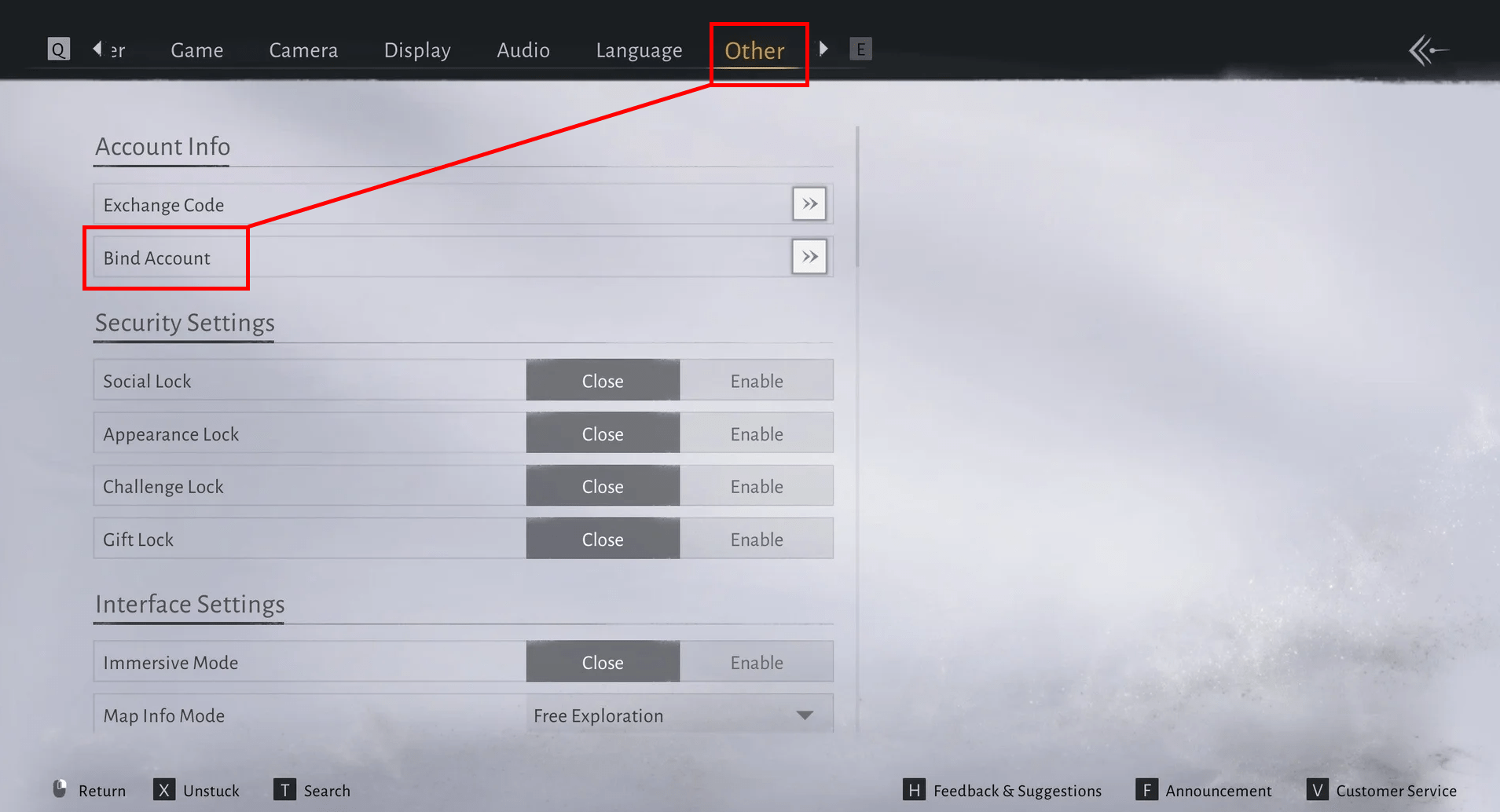
Cross-progression also works, but only if you link your accounts. To do this, go to Settings → Other → Bind Account and enter your login information. Once everything is linked, you can move between PS5 and PC freely, and your progress stays synced.
Cross-play is supported between all the platforms the game is on: PC, PlayStation 5, Xbox Series X|S, and Mobile.
Where Winds Meet Multiplayer FAQ
Here we have prepared answers to the most common questions about how to play Where Winds Meet with friends.
Can You Play Where Winds Meet in Co-op?
Yes. The story quests can be progressed in Solo or Co-op Mode, but cannot be progressed in Online mode.
Can I Invite Friends in Solo Mode in Where Winds Meet?
Yes. You can invite friends, which will count as a Co-op mode, but you won’t see random players the way you would in Online mode.
How Many Players Can Co-op in Where Winds Meet?
You can invite up to five people, including the host, to play in Co-op mode in Where Winds Meet.
Is There Level Scaling in Where Winds Meet Co-op?
No. Enemies scale to the host. Joining a higher-level friend might be difficult, but it also means stronger players can help you.
Does Where Winds Meet Support Crossplay Across PC, PS5, and Mobile?
Yes. Cross-play is always on, and PC, PS5, Xbox, and Mobile players can join the same Co-op team or see each other in Online Mode.
With these systems in mind, you’re ready to jump into Where Winds Meet with friends or other players. Online Mode, Co-op, and PvP all offer different experiences, so you can switch between them depending on what you’re in the mood for. Get to level 10, open the mode menu, and you’re good to go.
