In our FragPunk Best Settings guide, we will tell you about the most practical settings. You’ll learn about the best display, graphics, and audio settings in FragPunk for smoother gameplay and understand how to adjust them to your needs. Additionally, we provide import codes to allow you to copy and paste the best setting straight into the game.
 4.9
4.9FragPunk Best Graphics Settings
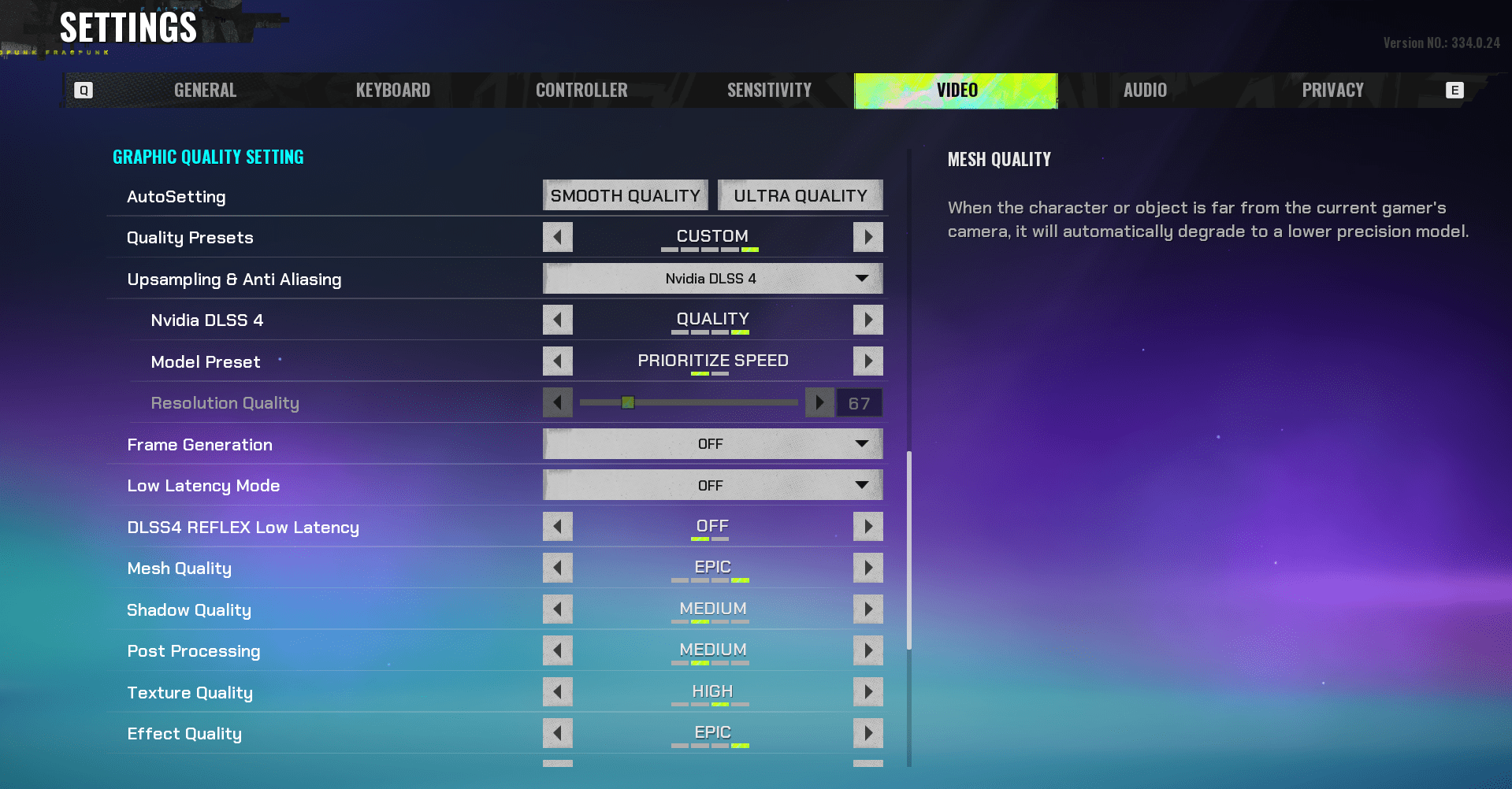
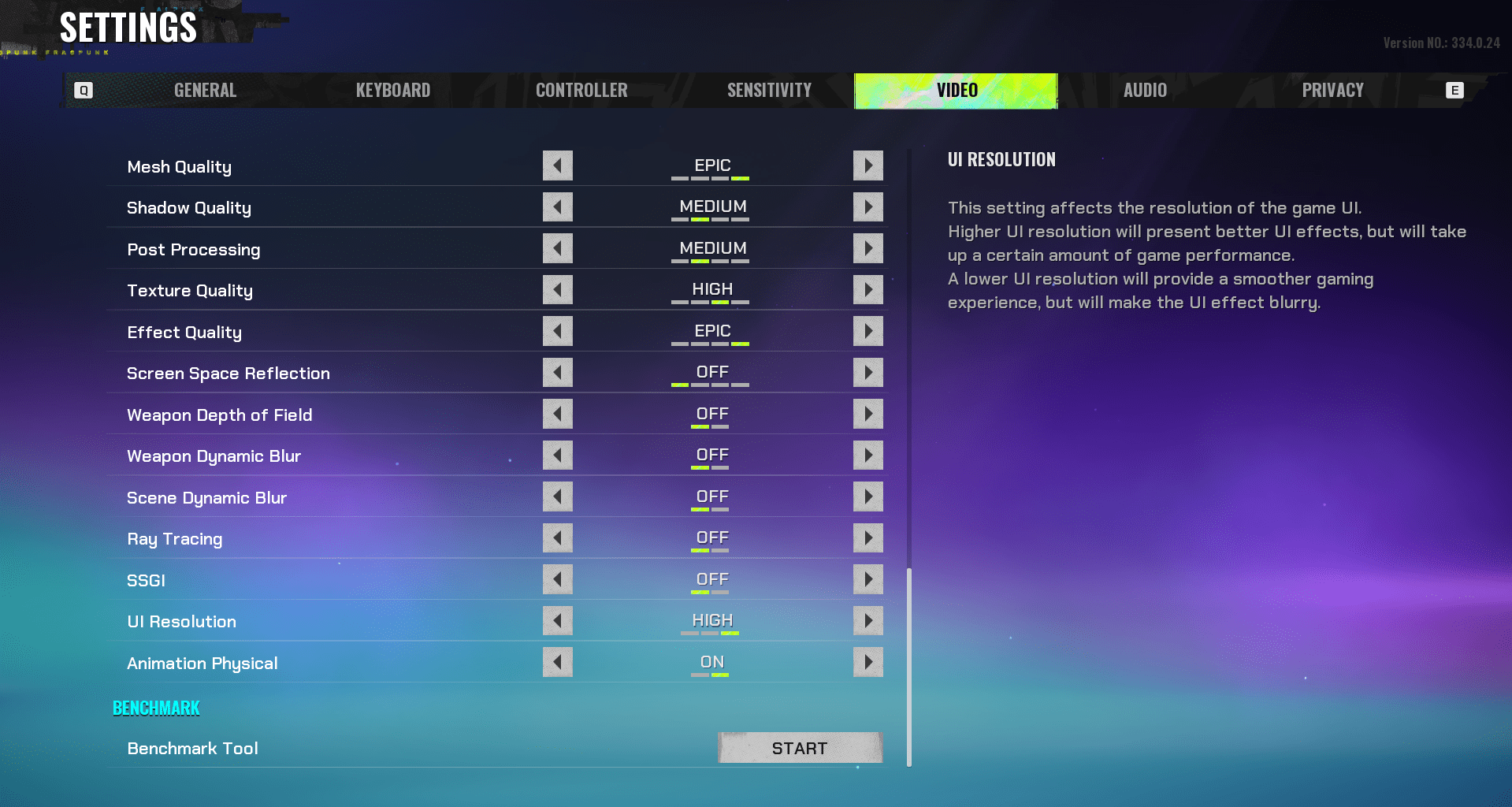
You can achieve both balanced graphics and game performance in FragPunk by choosing the optimal graphics settings for smooth gameplay. Below is one of the best graphics settings for FragPunk that you can import into the game to apply the given parameters:
100536630804750
Here are optimized graphics settings to get maximum FPS and visual clarity in FragPunk:
| Setting | Recommended Option |
|---|---|
| Upsampling & Anti-Aliasing | DLSS (RTX GPUs), FSR 3, TAA (no upscaling) |
| NVIDIA DLSS 4 / AMD FSR 3 | Quality |
| Resolution Quality | 100 (No Upscaling) |
| Frame Generation | OFF |
| Low Latency Mode | OFF |
| Mesh Quality | Epic |
| Shadow Quality | Medium |
| Post Processing | Medium |
| Texture Quality | GPU VRAM Dependent |
| Effect Quality | Medium |
| Screen Space Reflection | OFF |
| Weapon Depth of Field | OFF |
| Weapon Dynamic Blur | OFF |
| Scene Dynamic Blur | OFF |
| Ray Tracing | OFF |
| SSGI | OFF |
| UI Resolution | High |
| Animation Physical | ON |
Best Display Settings for FragPunk
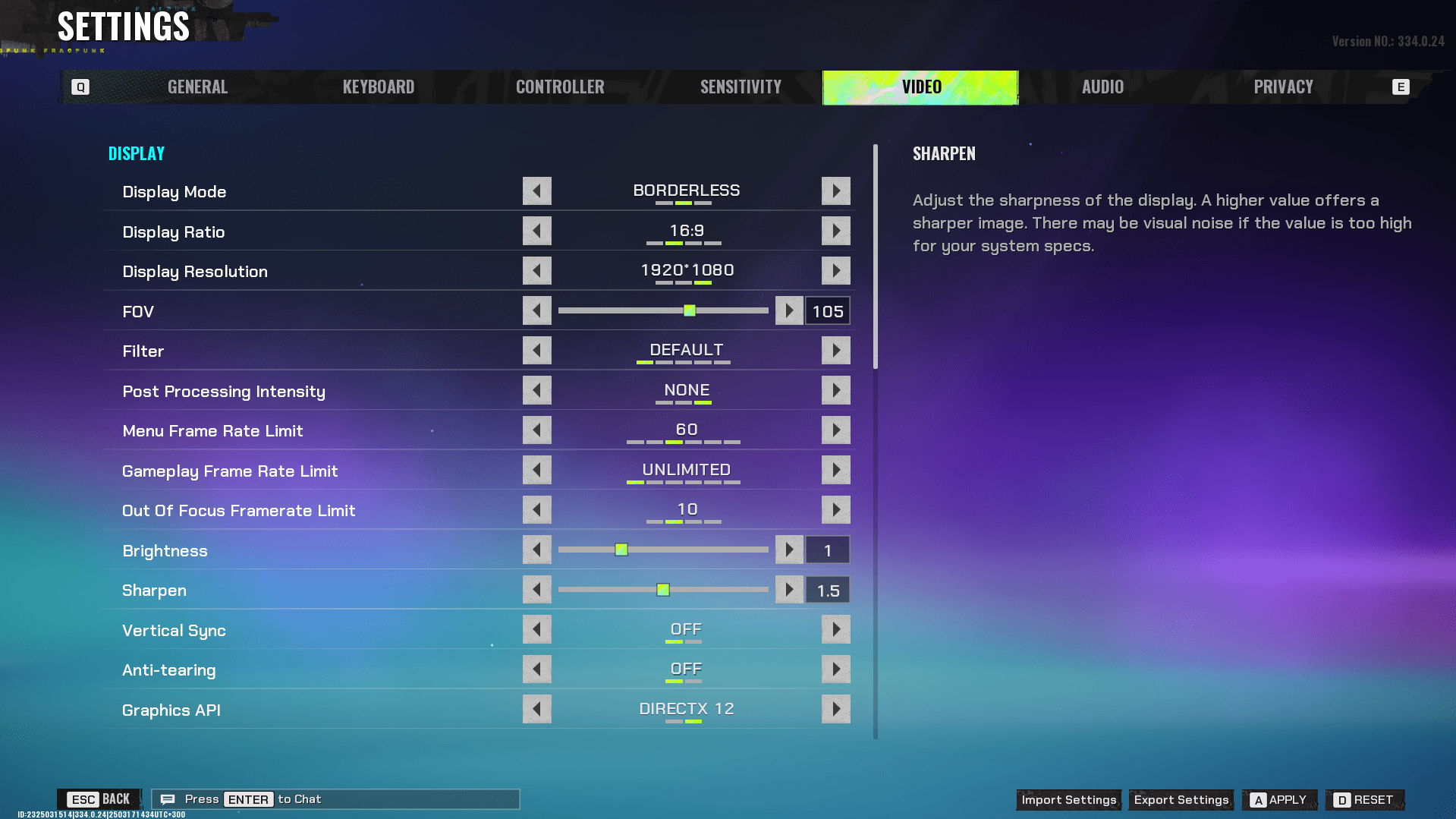
It is crucial to adjust your graphics settings in FragPunk to get the best balance between visuals and performance for competitive players. Display Resolution, FOV, Frame Rate limit, and other image settings are equally important for high FPS for competitive play and immersive visuals. Here are the best Display settings for FragPunk:
| Setting | Recommended Option |
|---|---|
| Display Mode | Borderless |
| Display Ratio or Aspect ratio | 16:9 |
| Display Resolution | Native |
| FOV | 105 |
| Post Processing Intensity | None |
| Menu Frame Limit | 60 |
| Gameplay Frame Rate Limit | Unlimited / Monitor Refresh Rate |
| Out of Focus Framerate | 10 / 30 |
| Sharpen | 1.5 |
| Vertical Sync | OFF |
| Anti-tearing | On (DX12), Off (DX11) |
| Graphics API | DX11 (non-RT, <8GB VRAM), DX12 (RT, 8GB+ VRAM) |
📌 Note: If your PC still struggles to provide a decent image and have performance loss, you might need to lower some video settings and visual effects to reduce input lag and increase responsiveness.
Choosing the best settings is an important step towards improving your gameplay clarity, but not the last one. You still need to learn how to play, and it might take a lot of time. However, to make the process of climbing the ladder easier, you can contact our Pro Players and ask them to assist you in reaching your desired rank.
FragPunk Best Minimalist Graphics Settings
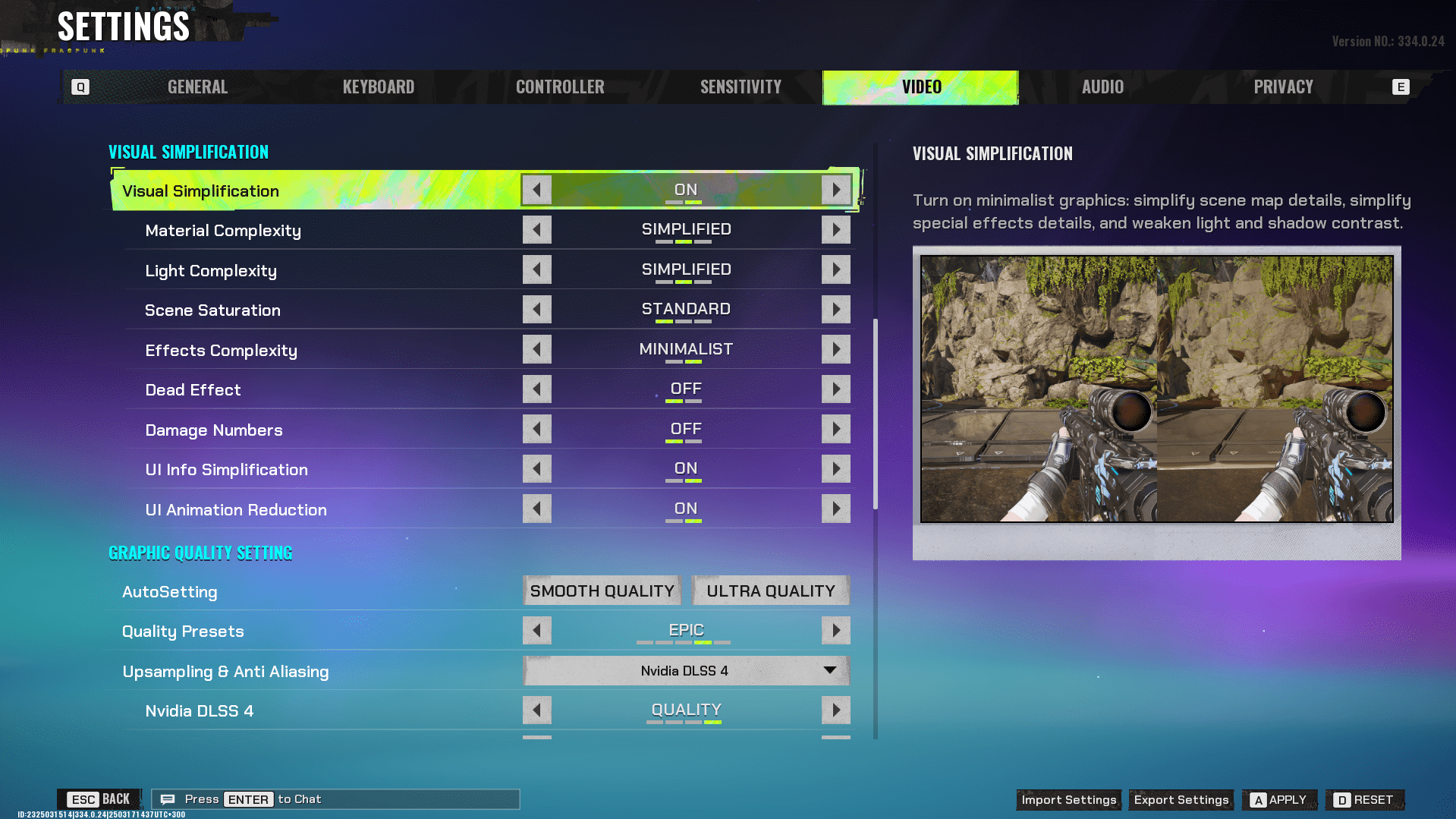
In FragPunk you may use visual simplification to lower the graphics quality, lower the complexity of the light, reduce visual clutter from explosions, or lower the visual quality effect complexity. You can perform this in order to avoid lagging or to improve your PC’s performance if you experience colossal performance losses. Minimum settings are of the utmost assistance to the budget PCs. Below we’ve compiled the list of the most effective minimalist FragPunk video settings:
| Setting | Recommended Option |
|---|---|
| Material Complexity | Simplified |
| Light Complexity | Simplified / Minimalist |
| Screen Saturation | Standard |
| Effects Complexity | Minimalist |
| Dead Effect | Off |
| Damage Numbers | Off |
| UI Info Simplification | On |
| UI Animation Reduction | On |
You’ve set up the perfect settings, and now it’s time to relax. While you take a break, our pro players can level up your account for you. Contact us and get the Account Level you desire.
FragPunk Best Ray Tracing Settings
FragPunk is a fast-paced shooter, so achieving high FPS is more important than visual enhancements. Still, if your hardware is powerful enough and you’d like stunning visuals, you can experiment with Ray Tracing video settings. Here are our recommended video settings for Ray Tracing in FragPunk:
| Graphical Option | Recommended Setting | Performance Impact |
|---|---|---|
| Ray Tracing Reflections | On | Visual fidelity upgrade, moderate impact |
| Ray Tracing Shadows | Off | Large performance drop, minor visual gain |
| Ray Tracing Ambient Occlusion | Off | High-performance cost, limited improvement |
| Ray Tracing Global Illumination | On | Minimal impact enhances overall lighting |
📌 Note: Turning on Ray Tracing will drastically lower your FPS. For a balance of performance and graphics, leave Reflections and Global Illumination on and turn off Shadows and Ambient Occlusion.
FragPunk Best Audio Settings
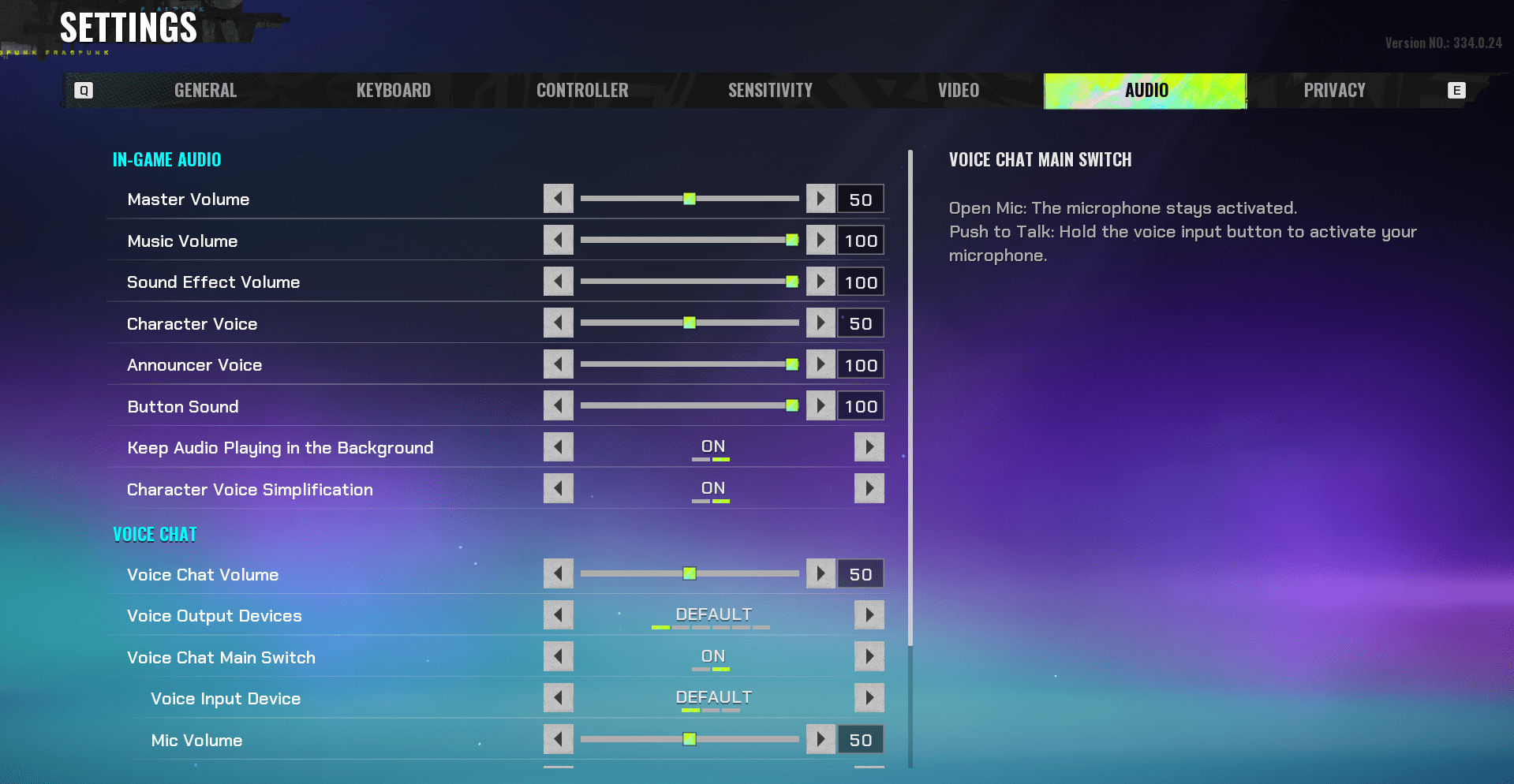
You can find the Audio and Voice settings in the Audio tab within the game settings. Simply click the gear icon to open the settings menu, navigate to the Audio tab, and you’ll be able to adjust all sound-related options. Additionally, you can use the audio setting code for FragPunk to quickly install these settings on your PC:
31748434592014
Below we provide a breakdown of the best audio settings in FragPunk, along with our recommended options:
| Setting | Recommended Option |
|---|---|
| Master Volume | 50 |
| Music Volume | 100 |
| Sound Effect Volume | 100 |
| Character Voice | 50 |
| Announcer Voice | 100 |
| Button Sound | 100 |
| Keep Audio Playing in the Background | On |
| Character Voice Simplification | On |
| Voice Chat Volume | 50 |
| Voice Output Devices | Preference |
| Voice Chat Main Switch | On |
| Voice Input Device | Preference |
| Mic Volume | 50 |
| Voice Chat Input (Team) | Push-to-talk |
FragPunk Best Controller Settings
We’ve prepared the best controller settings for FragPunk to help you if you enjoy playing shooters with a gamepad.
| Setting | Recommended Value |
|---|---|
| Movement Sensitivity | 1.8 (adjust as needed, range: 1.0 – 1.8) |
| Left Stick Dead Zone | 0.05 (increase if controller drift occurs) |
| Right Stick Dead Zone | As low as possible (adjust to avoid drift) |
| Boost Delay | 0.25 |
| Yaw Boost (Horizontal, not aiming) | 2.2 |
| Pitch Boost (Vertical, not aiming) | 1.85 |
| Yaw Boost (While Aiming) | 1.85 |
| Pitch Boost (While Aiming) | 1.85 |
| Cursor Sensitivity (Menus/UI) | 2.0+ |
| Vibration | Off |
| Aim Assist | Enabled |
FragPunk Best Controller Keybinds
With these Best Controller Keybinds in FragPunk, you’ll become a ladder-dominating killing machine.
| Action | Default Keybind |
|---|---|
| Fire | R2 / Right Trigger |
| Aim | L2 / Left Trigger |
| Jump | X / A |
| Sprint | L3 / Left Stick Click |
| Crouch | O / B |
| Reload | Square / X |
| Weapon Swap | R3 / Right Stick Click |
| Toggle Zoom | Triangle / Y |
| Interact | F / X |
| Shard Card Menu | P / Touchpad |
FragPunk Best Mouse Settings
Mouse settings in FragPunk are crucial for precision and responsiveness. The best mouse settings for FragPunk are the following:
| Setting | Recommended Value |
|---|---|
| Look Sensitivity | 1.3 (adjust as needed) |
| Invert Camera Y-Axis | Off |
| Camera Y-Axis Sensitivity | Off |
| Camera Sensitivity Mode | Custom |
| ADS Mouse Sensitivity Multiplier | 0.75 – 1.0 |
With these FragPunk mouse settings, reaching the top ranks will be much easier, but it can still take time and effort. Moreover, you need to get used to the game, if you are a newbie and learn all game mechanics. Focus on these aspects or on what matters to you, while our pro players will deal with Placement Matches for you.
Keyboard Settings for FragPunk
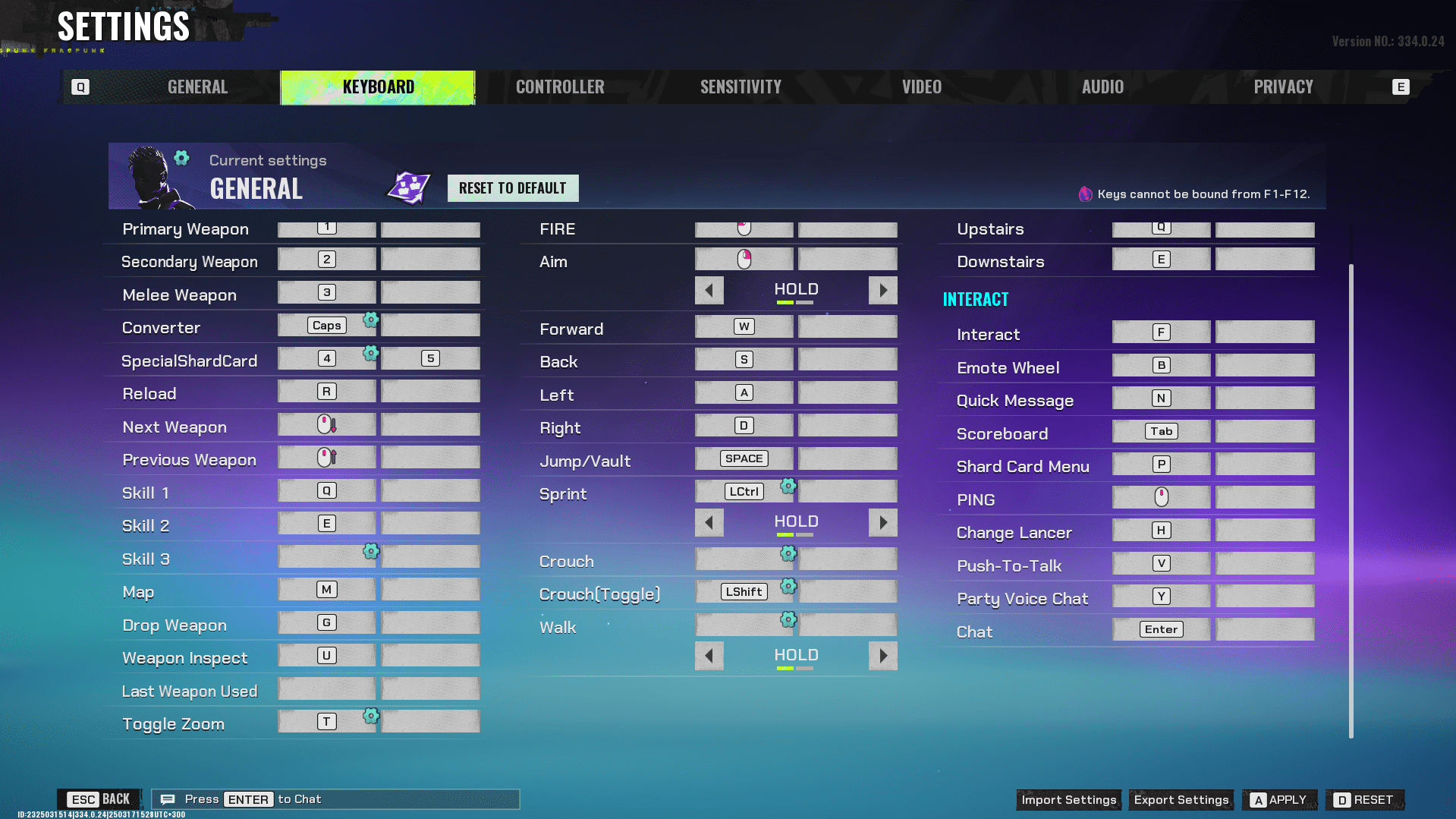
In this section, we’ve gathered all the required keyboard controls, including the best keyboard settings for FragPunk. Here you will find:
- Best Keybinds for FragPunk;
- Movement and Attack Keybinds for FragPunk;
- Game Navigation and Interaction Keybinds.
With these optimized keybinds, you’ll have an easier time climbing the ladder and dominating your matches. Here is an import code for quick FragPunk best keyboard settings installation:
90709745631502
📌 Note: The import code comprises all the best settings, including movement and attack keybinds, and game navigation and interaction keybinds. Just copy and import it into the game.
Best Keybinds for FragPunk
| Action | Keybind |
|---|---|
| Primary Weapon | Scroll Wheel Up OR 1 |
| Secondary Weapon | Scroll Wheel Down OR 2 |
| Melee Weapon | Mouse Button 3 |
| Converter | Caps |
| Special Shard Card | 4 |
| Reload | R |
| Drop Weapon | G |
| Weapon Inspect | U |
| Last Weapon Used | [Unbound] |
| Toggle Zoom | T |
Movement and Attack Keybinds for FragPunk
| Action | Keybind |
|---|---|
| Fire | Left Click (Mouse Button 1) |
| Aim | Right Click (Mouse Button 2) |
| Hold/Toggle Aim | Hold |
| Move Forward | W |
| Move Backward | S |
| Move Left | A |
| Move Right | D |
| Jump/Vault | Space |
| Sprint | Mouse Button 5 OR Ctrl |
| Sprint Mode | Toggle |
| Crouch | [Unbound] |
| Toggle Crouch | Left Shift OR C |
| Walk | Left Alt |
| Walk Mode | Toggle |
FragPunk Game Navigation and Interaction Keybinds
| Action | Keybind |
|---|---|
| Open Map | M |
| Move Upstairs (Map) | Q |
| Move Downstairs (Map) | E |
| Interact | F |
| Emote Wheel | B |
| Quick Message | N |
| Scoreboard | Tab |
| Shard Card Menu | P |
| Ping System | V |
| Change Lancer | H |
| Push-To-Talk | X |
| Party Voice Chat | Y |
| Chat | Enter |
FragPunk Best Settings FAQ
As a new competitive shooter, FragPunk is still a mystery to many players, and there are lots of questions arising every time you launch a game. In this section, we’ve gathered the most popular questions about the new 5v5 shooter FragPunk and answered them all for you.
How to Import Settings in FragPunk?
To import settings in FragPunk for smooth gameplay, you’ll need a code that you can paste using the Import button in the settings menu, located at the bottom right.
What Are The Best Settings for High FPS in FragPunk?
To maximize FPS in FragPunk, set textures to medium, disable motion blur, lower shadows, and effects, and use fullscreen mode. Also, enable NVIDIA Reflex if supported.
What is The Best FOV for FragPunk?
A FOV (Field of View) between 90-100 offers a good balance between visibility and performance in FargPunk for a good gameplay experience. Higher values give a wider view but may cause distortion.
Should I use V-Sync in FragPunk?
When playing FragPunk, it’s best to keep V-Sync off for lower input lag unless you experience screen tearing.
What Mouse Sensitivity is Best for FragPunk?
In FragPunk, the optimal DPI of 800-1600 with an in-game sensitivity of 0.4-0.8 is recommended for precise aiming.
How Can I Improve Audio for Enemy Footsteps in FragPunk?
To improve audio for enemy footsteps in FragPunk, you should enable 3D audio, use a good headset, and turn off background music to focus on crucial sounds like footsteps.
4.9In our FragPunk Best Settings guide, you’ve learned about the optimal settings for the game. You now know the best display, graphics, and audio settings in FragPunk for smooth gameplay. Good luck climbing the ladder in this exciting new game.
