It would seem that choosing a Crosshair in CS2 should not be something difficult. Quickly picked up a more or less beautiful one and went into battle. But it’s not a bit of it. In this Counter Strike 2 Crosshair Settings guide we will tell you everything about customizing, colors, Crosshair practice routines and more pro tips.
 4.9
4.9The thing is that after five minutes with a random crosshair, you start to notice that you hardly aim at enemies, hardly spray at them, hardly flick from target to target. On particularly yellow maps (like de_mirage, for example) your crosshair is barely visible, and once you’ve changed it, you stop seeing it on de_ancient or de_overpass.
So it turns out the crosshair is an important part of your gameplay? Absolutely! First you set up a comfortable crosshair, and then you learn to flick or kick from around the corner. Now let’s understand how to find the perfect crosshair for you in this Crosshair guide.
Understanding the Counter Strike 2 Crosshair: Aiming Essentials
Well, like we said, customizing Crosshair in Counter Strike 2 is a very important part of your gameplay. And even though it was mentioned above that crosshair is difficult to choose, it doesn’t mean that there is a universal crosshair for everyone or that you should play with the same one all the time.
For a crosshair to be perfect, it must meet several parameters: the color should be sufficiently contrasting with all colors of the environment on the maps, its length and width should be optimal for both tapping and spraying. You should also try two types of Counter Strike 2 crosshair styles: expanding and static. After that, decide which one is easier for you to play with. If you already realize by now that it’s hard enough to choose, you can buy our CS2 Coaching with professional CS2 players who will tell and show you all the nuances.
Statistically, most players choose the static one, because usually all timings are memorized automatically in your head, and you do not need third-party prompts in the form of narrowing the sight after the shot to understand how long you can shoot.
Customizing Your Crosshair: Style, Size and Gap
Tried both types and decided which one to choose? Wonderful! Let’s proceed to the step-by-step instructions for selecting a crosshair. And the first step – style, size and gap.
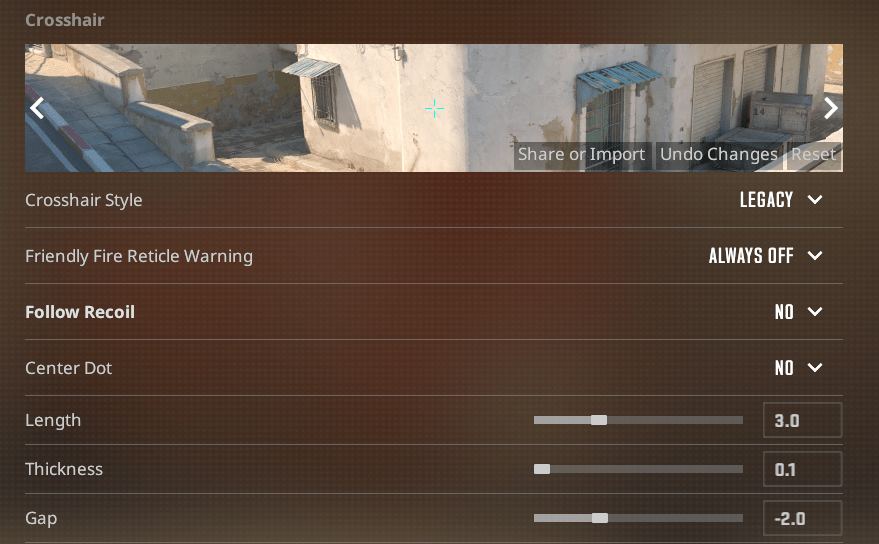
- Style – 3 options:
- Classic – Crosshair you get after launching CS:GO or CS2 for the first time. According to statistics and personal feelings of most players, the most uncomfortable variation. It is characterized by the fact that the gap widens both when walking and shooting. It greatly interferes with normal aiming;
- Classic Static – The most popular option. Fixed crosshairs that never widen. Most players choose this crosshair so that visually nothing interferes with it;
- Legacy – The crosshair is an amateur. When firing, the crosshair extends to the sides depending on the weapon. Doesn’t interfere much, there is quite an impressive percentage of players who play with this variant.
- Size – Length and Thickness. Everything is clear. We recommend you to try 3 as length parameter and 0.7 thickness;
- Gap – The gap between the sight lines. We advise you to set the parameter -2 or -3, because in this case you will optimally see the enemies in the crosshairs. Other gaps are a matter of taste.
Crosshair Colors: Enhancing Visibility in Combat

The best way to improve the visibility of the crosshair is to change its color to the most contrasting one. Crosshair colors for accuracy are cyan, yellow or green (R 0, G 255, B 255; R 255 G 255 B 0 ; R 0 G 255 B 0).
Your crosshair color in CS2 might seem like a small detail, but in real matches it directly affects reaction time and accuracy. A poorly visible crosshair can cost you crucial milliseconds in a duel.
High-contrast crosshair colors work best across different maps and lighting conditions:
- Cyan & Green – Universally popular, easy to track on most surfaces.
- Yellow – Great for darker areas and indoor fights.
- Pink/Magenta – Strong contrast for players who struggle with visual clutter.
Pro players often tweak crosshair colors depending on the map or even their monitor settings. The goal is simple: your crosshair should always be visible, no matter what’s happening on screen.
There is also such a parameter as Alpha. This is the setting of the transparency of the sight. The more Alpha, the less transparent the sight is, and vice versa. We recommend always setting this parameter to 255.
Pro Player Crosshair Configurations: Learn from the Best
Like we said, statistically the Classic Static sight is the most popular. And the experience of professional players confirms it. Below we will give some pro player Crosshair configurations, having tried them you will be able to form your own opinion and modify your crosshair.
In order to substitute this or that crosshair, copy all “cl_…” commands and paste them into the developer console (press the “~” button with “Launched With Developer Console” enabled). Press Enter and voila!
- s1mple: cl_crosshair_drawoutline 0; cl_crosshairalpha 255; cl_crosshaircolor 4; cl_crosshaircolor_b 144; cl_crosshaircolor_g 238; cl_crosshaircolor_r 0; cl_crosshairdot 0; cl_crosshairgap -3; cl_crosshairsize 2; cl_crosshairstyle 4; cl_crosshairthickness 0; cl_crosshair_sniper_width 1;
- ZywoO: cl_crosshair_drawoutline 0; cl_crosshairalpha 255; cl_crosshaircolor 4; cl_crosshaircolor_b 144; cl_crosshaircolor_g 238; cl_crosshaircolor_r 0; cl_crosshairdot 0; cl_crosshairgap -3; cl_crosshairsize 2; cl_crosshairstyle 4; cl_crosshairthickness 0; cl_crosshair_sniper_width 1;
- Niko: cl_crosshair_drawoutline 0; cl_crosshairalpha 255; cl_crosshaircolor 5; cl_crosshaircolor_b 145; cl_crosshaircolor_g 255; cl_crosshaircolor_r 0; cl_crosshairdot 0; cl_crosshairgap -4; cl_crosshairsize 1.5; cl_crosshairstyle 4; cl_crosshairthickness 0; cl_crosshair_sniper_width 1;
Advanced Crosshair Tips: Mastering Aiming Accuracy
Practicing inside the game is important, but dangerous. If you have set your aim as you like and are already confident in it, it is recommended to go and practice on bots, and then – against humans. Try flicks, try spraying on real player models and after that go into competitive battles! If you still doubt your skill, buy our Counter Strike 2 Rank Boosting to reach any rank you want.
Crosshair Practice and Refinement
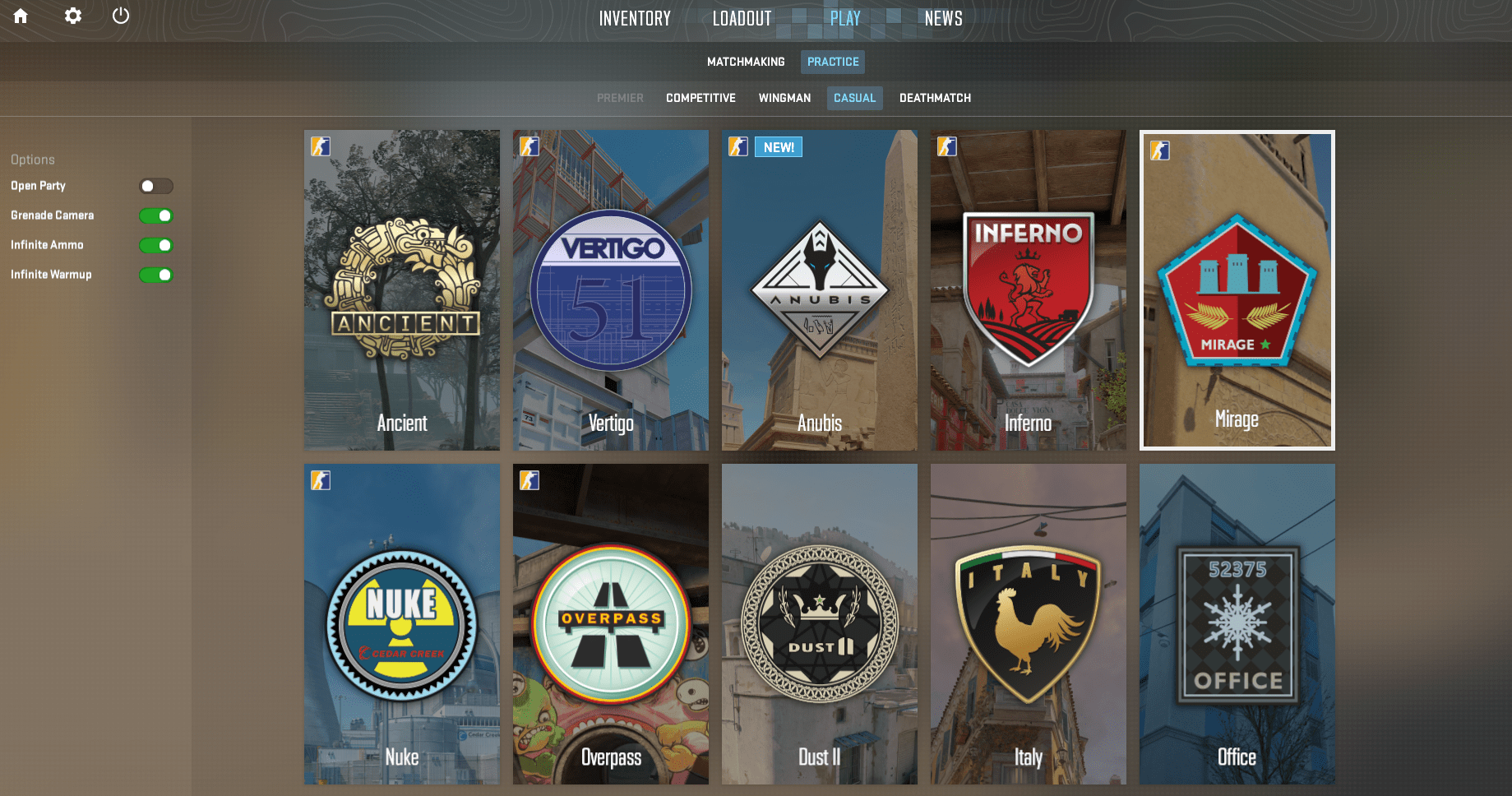
To practice your crosshair, you should go to Play, then Practice, Casual. Choose any map and make sure to set Infinite Ammo and Infinite Warmup on the left. This way you can shoot infinitely from any weapon without bots and players, which helps a lot in practicing the contrast of the sight and recoil controlling.
Resources for Counter Strike 2 Crosshair Customization
We don’t recommend you waste your time on third-party Counter Strike 2 Crosshair customization resources. Instead, go to the built-in settings in Counter Strike 2 itself! Here everything is done for you – crosshair previews on different backgrounds and a convenient customization menu.
F.A.Q.
- What is the CS2 crosshair, and why is it essential for aiming accuracy?
Counter Strike 2 crosshair is the main part of your gameplay. A crosshair that is conveniently tailored to you is guaranteed to improve your aim.
- How can I customize my crosshair in CS 2, including style, size, and gap settings?
Go to the settings menu and move the corresponding sliders.
- What are the best crosshair colors for improving visibility during combat in CS2?
Cyan, yellow, green or red. These colors are not used on maps.
- Can I use pro player Сrosshair configurations in CS2, and how can I find the settings of my favorite players?
If you haven’t chosen your style yet, be sure to give it a try. You can find them on the Internet.
- What advanced tips can help me master aiming accuracy with my customized crosshair in CS2?
Play with bots or without bots in Custom matches, and after that – against players.
4.9So, that’s all you need to know about crosshair settings in CS2 to improve you results. We hope our guide was useful for you. If it was, we would be glad if you share it with your friends!
