Customizing weapons in Active Matter allows you to empower your gun and perform better in matches. In this guide, you will learn how to customize weapons in Active Matter, where to do it, and how to buy mods for your weapon.
Active Matter How to Customize Weapons Key Takeaways:
- To customize your Active Matter weapon, open your inventory (I) or go to the safehouse, choose a gun and select Modding.
- The Active Matter workbench shows available slots (scope, suppressor, magazine, stock); attach parts slot-by-slot.
- Activate the gear button in Active Matter (quick-mod) on an attached firearm to automatically attach/change compatible components quickly.
- You can purchase mods in Active Matter Shop → Weapon Mods, or select “Purchase Ammunition and Mods” from any weapon to narrow down compatible items.
- Not all Active Matter weapons have all the slots; test on the firing range and adjust for balance and ADS speed.
Active Matter Weapons Customization
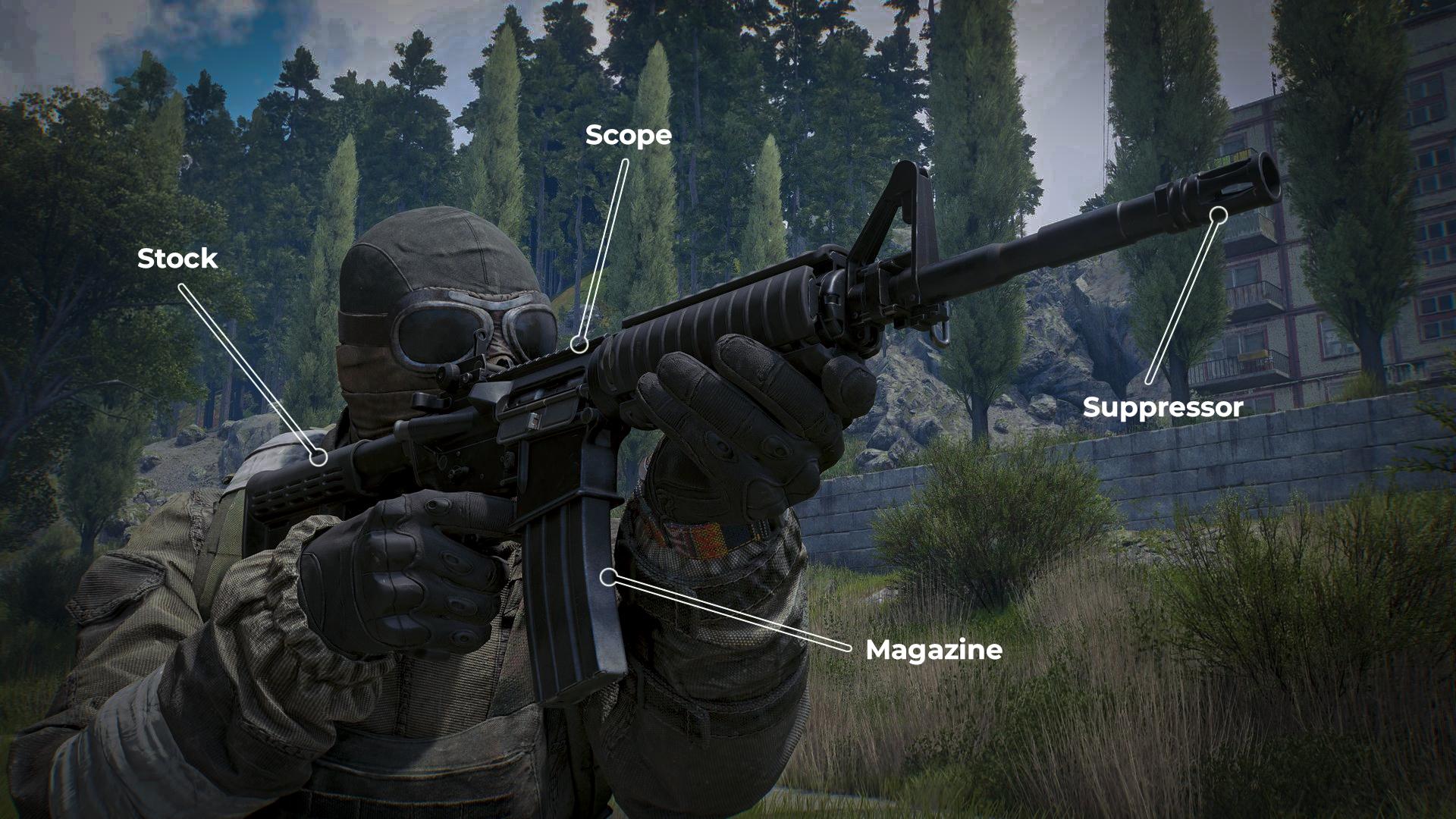
To start customizing your weapon in Active Matter, open your inventory (I) or head to the weapon wall in your safehouse and interact with it. Once the menu pops up, select the weapon you want to customize and right-click it. You’ll see several options there; choose “Modding”. This opens the full workbench view, where you can attach or remove parts like scopes, suppressors, magazines, and stocks.
Step-by-step Active Matter weapons customization setup:
- Open your inventory or the weapon wall screen.
- Select the weapon you want to tweak.
- Right-click the weapon to open the context menu.
- Choose Modding to enter the workbench.
- Pick a slot: barrel, scope, magazine, or stock.
- Click a mod to preview, then confirm to attach it.
One thing you should remember is that not every gun has the same slots. Pistols usually allow a suppressor and a larger mag, while rifles offer more room to tune.
If you want to do some quick adjustments, equip the weapon and click the gear icon on its item card. The quick-mod menu lets you attach parts fast, while the magazine slot sits just above that gear icon. In this menu, you can select auto-mod for each slot, which will speed up the process.
Where to Buy Weapon Mods in Active Matter
You can get Active Matter weapon mods during raids, but it’s often quicker to buy them. The shop in the game menu will provide you with the necessary equipment. To open it, open your menu (ESC or I), choose “Shop” from the top-left corner, then go to the “Weapon Mods” tab. There you’ll find all currently available modifications:
- Scopes and collimators;
- Stocks and cheeck pads;
- Suppressors and silencers;
- Magazines.
📌 Some of them rotate or become unlockable later, so try checking them out after some successful runs.
Additionally, you can acquire weapon mods for a desired weapon in a faster way. Open your inventory and right-click any gun that you want to buy mods for, and select “Buy Ammunition and Mods”. The shop will automatically narrow down the parts to fit that gun. It’s the quickest way to locate exactly what’s compatible with your setup.
Active Matter Weapons Customization FAQ
Here you will find answers to the most popular questions about weapon customization in Active Matter.
How to Open Modding Menu in Active Matter?
Open up the weapon wall from the safehouse or the mod menu (I), choose the weapon, then click Modding.
Can I Customize Weapons While Raiding?
No, you need to be in the UI of the safehouse or on the gun wall to access the full workbench. However, you can select auto-mod for each slot to quickly reassemble your build right before or in a raid.
Are Active Matter Mods Compatible With All Weapons?
No, not all mods are suitable for every weapon. Refer to the workbench to check the compatibility of the item from the shop or mod preview.
Are Mods Permanent When Attached to Weapons?
The mods stay on the gun in Active Matter until you remove them. You can reinstall parts that you remove at any time while in the Modding menu.
Does Death or Extraction Disable Mods from Functioning?
If you extract with the weapon, attached mods remain on it. If you lose the weapon in a raid, the mods are lost with the item.
What Is the Easiest Way to Buy Mods in Active Matter?
The easiest way to buy compatible mods is from the in-game shop. Right-click a weapon in your inventory and pick Buy Ammunition and Mods. The shop auto-filters parts that fit that weapon.
Now you know how to customize weapons in Active Matter, and fully prepared to improve your gameplay. Remember that you can get mods in raids or buy them straight from the in-game shop, attach everything you need in the Modding menu, and play like a pro. Check your weapon’s available slots to learn which mods you need.
